
How to Create an Incident Response Plan: A Step-By-Step Guide for SMBs
- James McCarthy
- Jun 26, 2025
- 3 min read
Introduction
Cyberattacks aren’t just a concern for large enterprises—small and mid-sized businesses (SMBs) are increasingly targeted due to weaker defenses and limited IT resources. One of the best ways to protect your business is by having a well-structured Incident Response Plan (IRP). This guide walks SMBs through the process of creating a simple yet effective IRP to minimize damage and recover quickly when a cyber incident occurs.
What Is an Incident Response Plan?
An Incident Response Plan is a documented set of instructions outlining how a business will detect, respond to, and recover from cybersecurity incidents. This includes data breaches, malware infections, phishing attacks, and ransomware events.
Having a formal response plan helps:
Minimize downtime and data loss
Maintain customer trust
Comply with industry regulations
Reduce financial and legal impact
Why Do SMBs Need an Incident Response Plan?
Many SMBs falsely believe they’re too small to be targeted. The reality? 43% of cyberattacks are aimed at small businesses, and 60% of those go out of business within 6 months of a major attack.
An IRP ensures you're not scrambling when a breach occurs. Instead, you respond with confidence, control, and clarity.
Step 1: Define What Constitutes an Incident
What should your business treat as a "security incident"?
Not every IT hiccup needs full escalation. Examples of incidents that should trigger your IRP include:
Unauthorized access to sensitive data
Malware or ransomware infections
Compromised user accounts
Unusual login activity or privilege escalations
Loss or theft of devices containing business data
Tip: Make a list of incident types relevant to your industry (e.g., HIPAA violations in healthcare).
Step 2: Assemble Your Incident Response Team
Who should be involved in the response process?
Even if you don’t have a large IT team, assign roles to:
Incident Manager – oversees the response process
IT Lead – investigates and resolves technical aspects
Communications Lead – manages internal and external messaging
Legal or Compliance Advisor – ensures regulatory requirements are met
Executive Sponsor – makes key decisions if escalation is needed
Document contact info and backup contacts for each role.
Step 3: Develop a Communication Plan
How will your team communicate during a crisis?
Define:
Primary communication channel (e.g., Slack, Microsoft Teams)
Alternative communication channel (in case of platform outage)
Who communicates with clients, partners, and media?
What language to use publicly vs. internally?
Pro Tip: Have pre-approved message templates ready to avoid confusion under pressure.
Step 4: Outline the Incident Response Phases
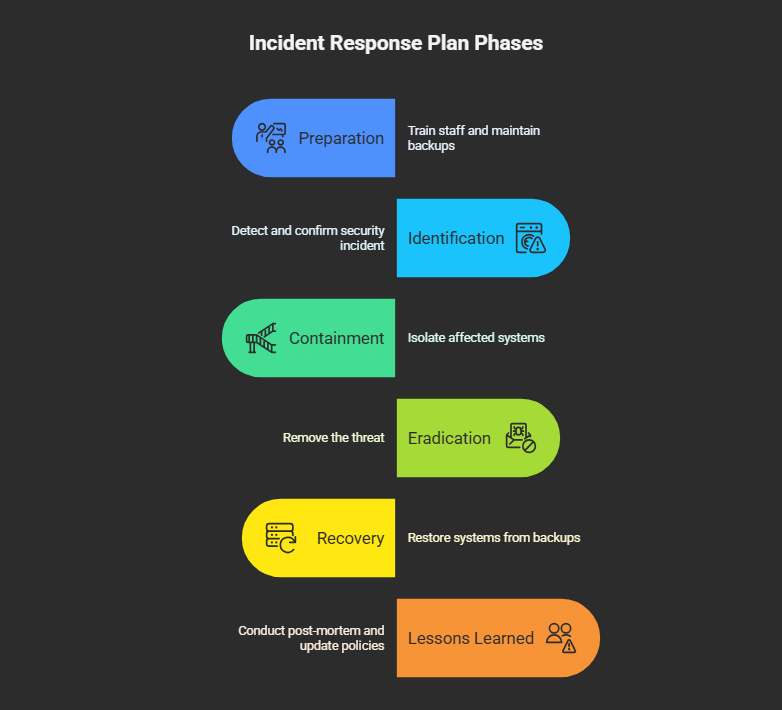
Structure your plan around the six key IRP phases defined by NIST:
Preparation
Train staff
Maintain updated backups
Run tabletop exercises
Identification
Detect and confirm a security incident
Record initial findings
Containment
Isolate affected systems or users
Prevent further damage
Eradication
Remove the threat (e.g., malware cleanup, patch vulnerabilities)
Recovery
Restore systems from clean backups
Monitor for signs of reinfection
Lessons Learned
Conduct a post-mortem
Update policies and training
Step 5: Document Your Response Procedures
Create checklists and flowcharts for each phase of your plan. Include:
Who does what and when
What tools or software are used
How to log evidence and preserve data for legal purposes
Bonus Tip: Store this document both physically and digitally in secure, easily accessible places.
Step 6: Train Employees and Run Simulations
Are your employees ready to act if a breach occurs?
Train everyone on how to recognize phishing, malware, and social engineering
Ensure they know how to report incidents (who to contact and how)
Run simulations or "fire drills" to test the effectiveness of your IRP
The faster and more calmly your team can respond, the less damage you’ll face.
Step 7: Review and Update Your Plan Regularly
Cyber threats evolve—so should your plan. Review your IRP:
Quarterly or bi-annually
After a real incident or simulation
Whenever there’s a major change in your tech or team
Sample Tools to Include in Your Incident Response Plan
SIEM Tools (e.g., Splunk, Sumo Logic)
EDR Solutions (e.g., CrowdStrike, SentinelOne)
Password Managers (e.g., LastPass, 1Password)
MFA Software (e.g., Duo Security)
Backup Tools (e.g., Acronis, Veeam)
Final Thoughts
An incident response plan isn’t a luxury—it’s a necessity. Whether you’re a five-person startup or a growing SMB, having a clear IRP can be the difference between a quick recovery and long-term damage. Take the time now to plan, so you’re not panicking later.
Want help building your custom incident response plan?


Comments